Yep, we may get a tiny thank-you (read: commission) when you buy through
links on Toolhuntr — not enough for a yacht, but enough to keep the lights (and
servers) on.
Learn more
68
Highlights
28
Differences
6
Reactions
0
Likes
FlashFish A501
vs
Jackery Explorer 1000:
68 Highlights & 28 Differences —
So, Which Portable Power Station Actually Works Better
If advanced specs and global certifications matter, Jackery’s your pick. For basic, affordable power, FlashFish fits the bill.
See how FlashFish A501 and Jackery Explorer 1000 compare in the specs that matter — from product type, ac charging input wattage, fire-resistant housing & smart temperature monitoring to extra features that could tip the scales.
FlashFish A501 vs Jackery Explorer 1000: Portable Power Stations Compared
In the realm of portable power stations, the FlashFish A501 and the Jackery Explorer 1000 stand out as two unisex devices tailored for users looking to power devices during outdoor adventures, emergencies, or off-grid living. Both models support pure sine wave inverters ensuring safe and stable power delivery compatible with sensitive electronics like CPAP machines. They also promise comprehensive battery protections including temperature, short circuit, overcurrent, overcharge, and over-discharge protection. Yet, their differences in charging technology, size, weight, and feature breadth make them suitable for distinct user profiles.
A Closer Look at the FlashFish A501
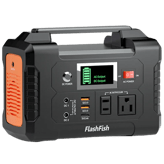
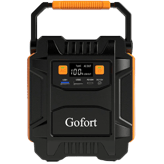
The FlashFish A501 impresses as a compact and lightweight portable power station, weighing just 14.1 lbs with manageable dimensions of 12.16" width by 8.56" depth and 9.17" height. It is ideal for users who place a premium on portability without sacrificing essential power features. Although it forgoes advanced components like an MPPT solar charge controller, it allows compatibility with up to two 100W solar panels, which can still provide reliable and quiet charging off-grid. Its 100W AC input wattage means it charges more slowly from wall outlets compared to higher-end rivals, but remains functional for typical daily use.
FlashFish emphasizes safety with a fire-resistant housing and full spectrum battery protections, complemented by smart temperature monitoring. Its user-friendly design includes a sturdy carry handle, though it lacks integrated cable storage or modular design features found in more premium models. It supports important applications such as CPAP compatibility and power tool support, making it versatile for emergency preparedness and basic off-grid cabin needs.
Budget-conscious buyers will appreciate its $310 at Alibaba.com price tag; a competitive rate for those who don't require the premium features of top-tier stations.
Exploring the Strengths of the Jackery Explorer 1000
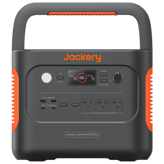
The Jackery Explorer 1000 is designed for users demanding robust power output and accelerated charging capabilities. It weighs substantially more, at 22.04 lbs, and is larger in footprint (13.1" x 9.2" x 11.1"), which reflects its higher capacity and enhanced engineering. A standout feature is its built-in MPPT solar charge controller, which optimizes solar charging efficiency and shortens recharge times when paired with solar panels.
This model supports up to two 100W solar panels like the FlashFish but ups the ante with an impressive 180W AC input wattage allowing faster wall outlet charging. Its capacity extends to medical devices beyond just CPAPs, and it is certified for broader market regions including Asia, reflecting a global launch reach.
Like its competitor, the Jackery offers all vital battery safety protections including smart temperature monitoring and a fire-resistant housing. However, it currently lacks some certifications like FCC and does not include water resistance or app connectivity, maintaining a straightforward, reliable operation philosophy.
While the Explorer 1000 comes with a steep price; listed around $344,474.05 at Jackery.com; it delivers premium performance suitable for power users requiring faster recharge cycles and more demanding applications.
The Quick Take
The FlashFish A501 shines as a cost-effective and lightweight option with dependable protections and essential power compatibility for everyday portable use. In contrast, the Jackery Explorer 1000 steps up with advanced charging technology, faster input wattage, and expanded medical device support, delivering a superior but heavier and pricier solution.
Bottom Line
If you seek a portable power station that balances affordability, portability, and basic safety features, the FlashFish A501 is an excellent pick for casual off-grid use or emergency backup. However, for those who prioritize faster charging performance and an overall more robust setup featuring MPPT solar control and extra device compatibility, the Jackery Explorer 1000 is worth the investment despite its size and cost.
Verdict
Winner: Jackery Explorer 1000 - Offers greater charging efficiency with built-in MPPT, larger AC input capacity, and medical device support, making it perfect for power-hungry users.
Runner-up: FlashFish A501 - A budget-friendly and lightweight option that covers essential functions and protections well, ideal for straightforward portable power needs.
Side by side. The numbers. The features. No drama.
From specs to real-life pros and cons, we broke down everything you need to know about FlashFish A501 vs Jackery Explorer 1000. This is your go-to portable power stations comparison if you want clarity before buying — no fluff, just useful insights.
48
Jackery Explorer 1000
0Votes
Portable Power Station
vs
Product Type
Both FlashFish A501 and Jackery Explorer 1000 are Portable Power Stations, confirming they serve the same use case for mobile power supply. This makes either suitable for similar portable power needs.
Defines the category of the product.
In the battle of Product Type,
FlashFish A501 ◉ is
better than
Jackery Explorer 1000 ◉
, delivering
higher
6 score
measurement.
Don’t keep it to yourself — be the first to react and review the
Product Type on FlashFish A501 ◉
vs Jackery Explorer 1000 ◉ and help others decide!
Gender Suitability is Unisex for both FlashFish A501 and Jackery Explorer 1000, meaning either device is designed for use by all users without gender-specific considerations.
Specifies if the product targets a gender.
In the battle of Gender Suitability,
FlashFish A501 ◉ is
better than
Jackery Explorer 1000 ◉
, delivering
higher
6 score
measurement.
Don’t keep it to yourself — be the first to react and review the
Gender Suitability on FlashFish A501 ◉
vs Jackery Explorer 1000 ◉ and help others decide!
47
Jackery Explorer 1000
0Votes
US, EU, Asia, Global
vs
Launch Market Region
FlashFish A501 is launched across US, EU, and Global markets, whereas Jackery Explorer 1000 adds Asia as well, covering US, EU, Asia, and Global. Jackery has a slightly broader market reach.
First region where the product was introduced.
In the battle of Launch Market Region,
FlashFish A501 ◉ is
better than
Jackery Explorer 1000 ◉
, delivering
higher
10 score
measurement.
Don’t keep it to yourself — be the first to react and review the
Launch Market Region on FlashFish A501 ◉
vs Jackery Explorer 1000 ◉ and help others decide!
Warranty Period
What is the warranty period?
24
months
0Votes
24
months
0Votes
FlashFish A501
Comes with a 2-year warranty, giving confidence in product reliability and manufacturer support.
Duration of manufacturer warranty coverage.
In the battle of Warranty Period,
FlashFish A501 ◉ is
same as
Jackery Explorer 1000 ◉
, delivering
equal
24.00 months
measurement.
Don’t keep it to yourself — be the first to react and review the
Warranty Period on FlashFish A501 ◉
vs Jackery Explorer 1000 ◉ and help others decide!
Model Name
What is the model name?
62
FlashFish A501
0Votes
A501
71
Jackery Explorer 1000
0Votes
Explorer 1000
vs
Model Name
The Model Name differs with FlashFish A501 simply named A501 while Jackery Explorer 1000 is named Explorer 1000. This distinction is minor but helps identify the specific product line for each portable power station.
Identifies the commercial name used in marketing.
In the battle of Model Name,
FlashFish A501 ◉ is
worse than
Jackery Explorer 1000 ◉
, delivering
lower
9 score
measurement.
Don’t keep it to yourself — be the first to react and review the
Model Name on FlashFish A501 ◉
vs Jackery Explorer 1000 ◉ and help others decide!
Model Number
What is the model number?
Who knows?
0Votes
FlashFish A501
(Help us out by suggesting one!)
Who knows?
0Votes
Jackery Explorer 1000
(Help us out by suggesting one!)
Manufacturer’s unique identifier for the model.
Don’t keep it to yourself — be the first to react and review the
Model Number on FlashFish A501 ◉
vs Jackery Explorer 1000 ◉ and help others decide!
Release Year
What year was it released?
64
FlashFish A501
0Votes
2022
38
Jackery Explorer 1000
0Votes
2020
Indicates the year the product was released to market.
In the battle of Release Year,
FlashFish A501 ◉ is
better than
Jackery Explorer 1000 ◉
, delivering
higher
26 score
measurement.
Don’t keep it to yourself — be the first to react and review the
Release Year on FlashFish A501 ◉
vs Jackery Explorer 1000 ◉ and help others decide!
Country of Manufacture
Where was it manufactured?
44
FlashFish A501
0Votes
China
38
Jackery Explorer 1000
0Votes
China
Specifies where the product was manufactured.
In the battle of Country of Manufacture,
FlashFish A501 ◉ is
better than
Jackery Explorer 1000 ◉
, delivering
higher
6 score
measurement.
Don’t keep it to yourself — be the first to react and review the
Country of Manufacture on FlashFish A501 ◉
vs Jackery Explorer 1000 ◉ and help others decide!
Target Market
What is the target market?
64
FlashFish A501
0Votes
US, EU, Asia, Global
58
Jackery Explorer 1000
0Votes
US, EU, Asia, Global
Defines the geographic or demographic market.
In the battle of Target Market,
FlashFish A501 ◉ is
better than
Jackery Explorer 1000 ◉
, delivering
higher
6 score
measurement.
Don’t keep it to yourself — be the first to react and review the
Target Market on FlashFish A501 ◉
vs Jackery Explorer 1000 ◉ and help others decide!
Age Group Suitability
What age group is it suitable for?
0
FlashFish A501
0Votes
Adults
0
Jackery Explorer 1000
0Votes
Adults
Indicates if the product has usage limitations by age.
In the battle of Age Group Suitability,
FlashFish A501 ◉ is
same as
Jackery Explorer 1000 ◉
.
Don’t keep it to yourself — be the first to react and review the
Age Group Suitability on FlashFish A501 ◉
vs Jackery Explorer 1000 ◉ and help others decide!
FlashFish A501 weighs 14.1 lbs, much lighter than Jackery Explorer 1000 which weighs 22.04 lbs. The Explorer 1000 is roughly 7.94 lbs heavier, making the A501 more portable and easier to carry.
The weight of the device itself.
In the battle of Product Weight,
FlashFish A501 ◉ is
better than
Jackery Explorer 1000 ◉
, delivering
lower
7.9 lbs
measurement.
Based on community votes for Product Weight,
FlashFish A501 ◉ earned
1 votes,
more than
Jackery Explorer 1000 ◉,
which got 0 votes.
The FlashFish A501 is just so much lighter at 14.1 lbs compared to the Jackery's 22.04 lbs making it easier to carry for day trips without sacrificing too much power.
FlashFish A501 has a depth of 8.56 inches, while Jackery Explorer 1000 is deeper at 9.2 inches. Explorer 1000 is about 0.64 inches deeper, potentially impacting storage space requirements.
The overall depth of the unit.
In the battle of Product Depth,
FlashFish A501 ◉ is
better than
Jackery Explorer 1000 ◉
, delivering
lower
0.6 inch
measurement.
Don’t keep it to yourself — be the first to react and review the
Product Depth on FlashFish A501 ◉
vs Jackery Explorer 1000 ◉ and help others decide!
Who knows?
0Votes
FlashFish A501
(Help us out by suggesting one!)
Who knows?
0Votes
Jackery Explorer 1000
(Help us out by suggesting one!)
Clearance space for wheeled models, useful on rough terrain.
Don’t keep it to yourself — be the first to react and review the
Underbody Clearance on FlashFish A501 ◉
vs Jackery Explorer 1000 ◉ and help others decide!
Product Width
What is the product width?
12.16
inch
0Votes
13.1
inch
0Votes
vs
Product Width
Product Width of FlashFish A501 is 12.16 inches versus the wider Jackery Explorer 1000 at 13.1 inches. The Explorer 1000 is about 0.94 inches wider, which may affect portability marginally.
The overall width of the unit.
In the battle of Product Width,
FlashFish A501 ◉ is
better than
Jackery Explorer 1000 ◉
, delivering
lower
0.9 inch
measurement.
Don’t keep it to yourself — be the first to react and review the
Product Width on FlashFish A501 ◉
vs Jackery Explorer 1000 ◉ and help others decide!
Product Height
What is the product height?
9.17
inch
0Votes
11.1
inch
0Votes
vs
Product Height
The height of FlashFish A501 is 9.17 inches compared to Jackery Explorer 1000's 11.1 inches. Explorer 1000 is nearly 2 inches taller which might affect its storage and handling.
The overall height of the unit.
In the battle of Product Height,
FlashFish A501 ◉ is
better than
Jackery Explorer 1000 ◉
, delivering
lower
1.9 inch
measurement.
Don’t keep it to yourself — be the first to react and review the
Product Height on FlashFish A501 ◉
vs Jackery Explorer 1000 ◉ and help others decide!
Package Width
What is the package width?
Who knows?
0Votes
FlashFish A501
(Help us out by suggesting one!)
Who knows?
0Votes
Jackery Explorer 1000
(Help us out by suggesting one!)
Width of the shipping package.
Don’t keep it to yourself — be the first to react and review the
Package Width on FlashFish A501 ◉
vs Jackery Explorer 1000 ◉ and help others decide!
Package Depth
What is the package depth?
Who knows?
0Votes
FlashFish A501
(Help us out by suggesting one!)
Who knows?
0Votes
Jackery Explorer 1000
(Help us out by suggesting one!)
Depth of the shipping package.
Don’t keep it to yourself — be the first to react and review the
Package Depth on FlashFish A501 ◉
vs Jackery Explorer 1000 ◉ and help others decide!
Package Height
What is the package height?
Who knows?
0Votes
FlashFish A501
(Help us out by suggesting one!)
Who knows?
0Votes
Jackery Explorer 1000
(Help us out by suggesting one!)
Height of the shipping package.
Don’t keep it to yourself — be the first to react and review the
Package Height on FlashFish A501 ◉
vs Jackery Explorer 1000 ◉ and help others decide!
Package Weight
What is the package weight?
Who knows?
0Votes
FlashFish A501
(Help us out by suggesting one!)
Who knows?
0Votes
Jackery Explorer 1000
(Help us out by suggesting one!)
The shipping weight including packaging.
Don’t keep it to yourself — be the first to react and review the
Package Weight on FlashFish A501 ◉
vs Jackery Explorer 1000 ◉ and help others decide!
Handle Type
What type of handle does it have?
34
FlashFish A501
0Votes
Fixed
28
Jackery Explorer 1000
0Votes
Fixed
Describes the type of handle provided.
In the battle of Handle Type,
FlashFish A501 ◉ is
better than
Jackery Explorer 1000 ◉
, delivering
higher
6 score
measurement.
Don’t keep it to yourself — be the first to react and review the
Handle Type on FlashFish A501 ◉
vs Jackery Explorer 1000 ◉ and help others decide!
Telescopic Handle Height
What is the telescopic handle height?
Who knows?
0Votes
FlashFish A501
(Help us out by suggesting one!)
Who knows?
0Votes
Jackery Explorer 1000
(Help us out by suggesting one!)
Maximum height of an extended telescopic handle.
Don’t keep it to yourself — be the first to react and review the
Telescopic Handle Height on FlashFish A501 ◉
vs Jackery Explorer 1000 ◉ and help others decide!
Both FlashFish A501 and Jackery Explorer 1000 include Pure Sine Wave Inverters, ensuring clean, stable power output ideal for sensitive electronics in each unit.
Indicates if the AC inverter provides pure sine wave output.
In the battle of Pure Sine Wave Inverter,
FlashFish A501 ◉ is
better than
Jackery Explorer 1000 ◉
, delivering
higher
1 score
measurement.
Don’t keep it to yourself — be the first to react and review the
Pure Sine Wave Inverter on FlashFish A501 ◉
vs Jackery Explorer 1000 ◉ and help others decide!
Neither FlashFish A501 nor Jackery Explorer 1000 supports Anderson Port Output, limiting connection options to other port types for both models.
Shows if Anderson Powerpole outputs are provided.
In the battle of Anderson Port Output Support,
FlashFish A501 ◉ is
same as
Jackery Explorer 1000 ◉
.
Don’t keep it to yourself — be the first to react and review the
Anderson Port Output Support on FlashFish A501 ◉
vs Jackery Explorer 1000 ◉ and help others decide!
Rated Power Output
What is the rated power output?
500
Watt
0Votes
1,000
Watt
0Votes
FlashFish A501
Provides continuous power up to 500 watts, enough to charge most electronics and small household devices safely.
Jackery Explorer 1000
Equivalent to the output of a typical microwave oven or a power tool, great for medium appliances.
Continuous power output supported by the inverter.
In the battle of Rated Power Output,
FlashFish A501 ◉ is
worse than
Jackery Explorer 1000 ◉
, delivering
lower
500.0 Watt
measurement.
Don’t keep it to yourself — be the first to react and review the
Rated Power Output on FlashFish A501 ◉
vs Jackery Explorer 1000 ◉ and help others decide!
Surge Power Output
What is the surge power output?
1,000
Watt
0Votes
2,000
Watt
0Votes
FlashFish A501
Can handle brief surges up to 1000 watts, useful for starting devices with higher startup power demands like power tools.
Jackery Explorer 1000
The surge power capability is twice the rated output, useful for handling devices with high startup power like refrigerators.
Maximum peak output for short bursts.
In the battle of Surge Power Output,
FlashFish A501 ◉ is
worse than
Jackery Explorer 1000 ◉
, delivering
lower
1,000.0 Watt
measurement.
Don’t keep it to yourself — be the first to react and review the
Surge Power Output on FlashFish A501 ◉
vs Jackery Explorer 1000 ◉ and help others decide!
USB-A Ports
How many USB-A ports are available?
54
FlashFish A501
0Votes
3 Ports
28
Jackery Explorer 1000
0Votes
2 Ports
FlashFish A501
Includes three ports USB-A, including: 1x QC3.0(18W); 2x 5V 2.4A.
Jackery Explorer 1000
Provides 2 x USB-A (12W and 18W), great for charging phones or tablets simultaneously.
Number of USB-A output ports.
In the battle of USB-A Ports,
FlashFish A501 ◉ is
better than
Jackery Explorer 1000 ◉
, delivering
higher
26 score
measurement.
Don’t keep it to yourself — be the first to react and review the
USB-A Ports on FlashFish A501 ◉
vs Jackery Explorer 1000 ◉ and help others decide!
USB-C Ports
How many USB-C ports are available?
61
FlashFish A501
0Votes
2 Ports
55
Jackery Explorer 1000
0Votes
2 Ports
FlashFish A501
Includes two ports USB-C PD Discharge: 1x 60W; 1x 33W.
Jackery Explorer 1000
Provides 2 x USB-C (18W max PD), ideal for fast charging newer smartphones and laptops.
Number of USB-C output ports.
In the battle of USB-C Ports,
FlashFish A501 ◉ is
better than
Jackery Explorer 1000 ◉
, delivering
higher
6 score
measurement.
Don’t keep it to yourself — be the first to react and review the
USB-C Ports on FlashFish A501 ◉
vs Jackery Explorer 1000 ◉ and help others decide!
USB-C Power Delivery Wattage
What is the USB-C PD wattage?
60
Watt
0Votes
18
Watt
0Votes
FlashFish A501
Supports fast charging via USB-C port up to 60 watts, ideal for laptops, tablets, and compatible smartphones.
Jackery Explorer 1000
This supports fast charging for USB-C compatible devices, like laptops or tablets.
Maximum Power Delivery (PD) rating for USB-C ports.
In the battle of USB-C Power Delivery Wattage,
FlashFish A501 ◉ is
better than
Jackery Explorer 1000 ◉
, delivering
higher
42.0 Watt
measurement.
Don’t keep it to yourself — be the first to react and review the
USB-C Power Delivery Wattage on FlashFish A501 ◉
vs Jackery Explorer 1000 ◉ and help others decide!
Battery Capacity
What is the battery capacity?
540
Wh
0Votes
1,002
Wh
0Votes
Jackery Explorer 1000
This is 1.002 kWh, which is enough to power a 60W LED light for over 16 hours.
Total energy storage capacity of the battery.
In the battle of Battery Capacity,
FlashFish A501 ◉ is
worse than
Jackery Explorer 1000 ◉
, delivering
lower
462.0 Wh
measurement.
Don’t keep it to yourself — be the first to react and review the
Battery Capacity on FlashFish A501 ◉
vs Jackery Explorer 1000 ◉ and help others decide!
AC Output Ports
How many AC outlets are included?
94
FlashFish A501
0Votes
6 Outlets
38
Jackery Explorer 1000
0Votes
3 Outlets
Jackery Explorer 1000
Includes three AC outlets (US model) allow you to power multiple devices at the same time, perfect for small appliances.
Number of AC outlets available.
In the battle of AC Output Ports,
FlashFish A501 ◉ is
better than
Jackery Explorer 1000 ◉
, delivering
higher
56 score
measurement.
Don’t keep it to yourself — be the first to react and review the
AC Output Ports on FlashFish A501 ◉
vs Jackery Explorer 1000 ◉ and help others decide!
Car Socket Output
How many car sockets are available?
34
FlashFish A501
0Votes
1 Outlet
28
Jackery Explorer 1000
0Votes
1 Outlet
Jackery Explorer 1000
1 x Car Port (12V/10A), to charge devices like car refrigerators or 12V air compressors.
Number of 12V car-style sockets.
In the battle of Car Socket Output,
FlashFish A501 ◉ is
better than
Jackery Explorer 1000 ◉
, delivering
higher
6 score
measurement.
Don’t keep it to yourself — be the first to react and review the
Car Socket Output on FlashFish A501 ◉
vs Jackery Explorer 1000 ◉ and help others decide!
Car Socket Wattage
What is the car socket wattage?
120
Watt
0Votes
120
Watt
0Votes
Jackery Explorer 1000
This supports devices that draw up to 120W, such as portable car coolers or other 12V accessories.
Wattage supported by car socket outputs.
In the battle of Car Socket Wattage,
FlashFish A501 ◉ is
same as
Jackery Explorer 1000 ◉
, delivering
equal
120.00 Watt
measurement.
Don’t keep it to yourself — be the first to react and review the
Car Socket Wattage on FlashFish A501 ◉
vs Jackery Explorer 1000 ◉ and help others decide!
Frequency
What is the output frequency?
94
FlashFish A501
0Votes
50/60Hz
88
Jackery Explorer 1000
0Votes
50/60Hz
vs
Frequency
Frequency for both FlashFish A501 and Jackery Explorer 1000 is 50/60Hz, making them compatible with standard power grids globally without frequency issues.
AC output frequency (usually 50Hz or 60Hz).
In the battle of Frequency,
FlashFish A501 ◉ is
better than
Jackery Explorer 1000 ◉
, delivering
higher
6 score
measurement.
Don’t keep it to yourself — be the first to react and review the
Frequency on FlashFish A501 ◉
vs Jackery Explorer 1000 ◉ and help others decide!
24V/48V Output Support
Does it support 24V/48V output?
No
0Votes
FlashFish A501
No
0Votes
Jackery Explorer 1000
vs
24V/48V Output Support
Neither FlashFish A501 nor Jackery Explorer 1000 supports 24V/48V Output, so neither is suitable for devices requiring these voltage outputs.
Indicates if the unit supports high-voltage DC outputs.
In the battle of 24V/48V Output Support,
FlashFish A501 ◉ is
same as
Jackery Explorer 1000 ◉
.
Don’t keep it to yourself — be the first to react and review the
24V/48V Output Support on FlashFish A501 ◉
vs Jackery Explorer 1000 ◉ and help others decide!
DC Barrel Jack
How many DC barrel output ports does it have?
84
FlashFish A501
0Votes
3 Ports
0
Jackery Explorer 1000
0Votes
Not Provided
FlashFish A501
Features three ports dc barrel jack (DC-5521), providing 120W each perfect for powering compatible devices, like CPAP.
The number of DC barrel-style output ports available for powering compatible devices.
In the battle of DC Barrel Jack,
FlashFish A501 ◉ is
better than
Jackery Explorer 1000 ◉
, delivering
higher
84 score
measurement.
Don’t keep it to yourself — be the first to react and review the
DC Barrel Jack on FlashFish A501 ◉
vs Jackery Explorer 1000 ◉ and help others decide!
AC Output Wattage
What is the AC output wattage?
500
W
0Votes
1,000
W
0Votes
The amount of power the unit can provide to AC devices.
In the battle of AC Output Wattage,
FlashFish A501 ◉ is
worse than
Jackery Explorer 1000 ◉
, delivering
lower
500.0 W
measurement.
Don’t keep it to yourself — be the first to react and review the
AC Output Wattage on FlashFish A501 ◉
vs Jackery Explorer 1000 ◉ and help others decide!
DC Output Ports
How many DC output ports are there?
Who knows?
0Votes
FlashFish A501
(Help us out by suggesting one!)
Who knows?
0Votes
Jackery Explorer 1000
(Help us out by suggesting one!)
Number of DC output ports available.
Don’t keep it to yourself — be the first to react and review the
DC Output Ports on FlashFish A501 ◉
vs Jackery Explorer 1000 ◉ and help others decide!
Wireless Charging Pad
Does it have a wireless charging pad?
No
0Votes
FlashFish A501
No
0Votes
Jackery Explorer 1000
Indicates if a wireless charging pad is included.
In the battle of Wireless Charging Pad,
FlashFish A501 ◉ is
same as
Jackery Explorer 1000 ◉
.
Don’t keep it to yourself — be the first to react and review the
Wireless Charging Pad on FlashFish A501 ◉
vs Jackery Explorer 1000 ◉ and help others decide!
RV/TT-30 Outlet Support
Does it have a TT-30 outlet?
No
0Votes
FlashFish A501
No
0Votes
Jackery Explorer 1000
vs
RV/TT-30 Outlet Support
Neither FlashFish A501 nor Jackery Explorer 1000 supports RV/TT-30 outlets. Both devices lack this outlet option, so neither is suitable for RV/TT-30 specific outlet use.
Indicates if there’s a TT-30 outlet for RVs.
In the battle of RV/TT-30 Outlet Support,
FlashFish A501 ◉ is
same as
Jackery Explorer 1000 ◉
.
Don’t keep it to yourself — be the first to react and review the
RV/TT-30 Outlet Support on FlashFish A501 ◉
vs Jackery Explorer 1000 ◉ and help others decide!
UPS Switching Time
What is the UPS switching time?
Who knows?
0Votes
FlashFish A501
(Help us out by suggesting one!)
Who knows?
0Votes
Jackery Explorer 1000
(Help us out by suggesting one!)
Time taken for the UPS system to switch from grid power to battery power.
Don’t keep it to yourself — be the first to react and review the
UPS Switching Time on FlashFish A501 ◉
vs Jackery Explorer 1000 ◉ and help others decide!
DC Output Ports (Others)
How many other DC output ports are available?
Who knows?
0Votes
FlashFish A501
(Help us out by suggesting one!)
Who knows?
0Votes
Jackery Explorer 1000
(Help us out by suggesting one!)
The number of other DC output ports (such as aviation, Anderson, or special-purpose ports)
Don’t keep it to yourself — be the first to react and review the
DC Output Ports (Others) on FlashFish A501 ◉
vs Jackery Explorer 1000 ◉ and help others decide!
AC Charging Input Wattage is 100W for FlashFish A501 and 180W for Jackery Explorer 1000. Explorer 1000 can recharge faster via AC input making it more suitable for quick recharge.
Maximum AC input wattage supported for charging.
In the battle of AC Charging Input Wattage,
FlashFish A501 ◉ is
worse than
Jackery Explorer 1000 ◉
, delivering
lower
80.0 Watt
measurement.
Based on community votes for AC Charging Input Wattage,
FlashFish A501 ◉ earned
0 votes,
less than
Jackery Explorer 1000 ◉,
which got 2 votes.
With a 180W AC input, the Jackery Explorer 1000 charges way faster from a wall outlet which is clutch when you're in a hurry or on the go compared to the FlashFish's slower 100W input.
Both FlashFish A501 and Jackery Explorer 1000 support up to 2 x 100W solar panels, offering similar solar input capacity for off-grid recharging scenarios.
Maximum number of solar panels that can be connected simultaneously.
In the battle of Max Solar Panel Count Supported,
FlashFish A501 ◉ is
better than
Jackery Explorer 1000 ◉
, delivering
higher
5 score
measurement.
Don’t keep it to yourself — be the first to react and review the
Max Solar Panel Count Supported on FlashFish A501 ◉
vs Jackery Explorer 1000 ◉ and help others decide!
Only Jackery Explorer 1000 includes a built-in MPPT Controller, enhancing solar charging efficiency, whereas FlashFish A501 lacks this feature, making Explorer 1000 better for solar use.
Shows if the unit includes a built-in MPPT for solar optimization.
In the battle of MPPT Controller Built-in,
FlashFish A501 ◉ is
worse than
Jackery Explorer 1000 ◉
.
Based on community votes for MPPT Controller Built-in,
FlashFish A501 ◉ earned
0 votes,
less than
Jackery Explorer 1000 ◉,
which got 1 votes.
I really like how the Jackery Explorer 1000 has a built-in MPPT controller which boosts solar charging efficiency big time making it worth the extra weight and price.
See more
Solar Charging Input Wattage
What is the solar charging input wattage?
120
Watt
0Votes
200
Watt
0Votes
FlashFish A501
Supports solar panel charging up to 120 watts, allowing off-grid recharging typically in about 4.5 hours with two 100W panels.
Jackery Explorer 1000
You can use up to 200W of solar panels, with 2 x 100W panels being a common option for solar recharging.
Maximum supported solar input wattage.
In the battle of Solar Charging Input Wattage,
FlashFish A501 ◉ is
worse than
Jackery Explorer 1000 ◉
, delivering
lower
80.0 Watt
measurement.
Don’t keep it to yourself — be the first to react and review the
Solar Charging Input Wattage on FlashFish A501 ◉
vs Jackery Explorer 1000 ◉ and help others decide!
Car Charging Input Wattage
What is the car charging input wattage?
120
Watt
0Votes
163
Watt
0Votes
FlashFish A501
Can charge from a vehicle’s socket at 120 watts, usually taking around 4.6 hours for a full recharge during travel.
Jackery Explorer 1000
The car charging input for the standard Jackery Explorer 1000 is approximately 83 watts (12V at 6.63A), with a maximum DC input of 163 watts.
Maximum wattage accepted via car port.
In the battle of Car Charging Input Wattage,
FlashFish A501 ◉ is
worse than
Jackery Explorer 1000 ◉
, delivering
lower
43.0 Watt
measurement.
Don’t keep it to yourself — be the first to react and review the
Car Charging Input Wattage on FlashFish A501 ◉
vs Jackery Explorer 1000 ◉ and help others decide!
Charging Time (AC)
How long to charge via AC?
330
minutes
0Votes
450
minutes
0Votes
FlashFish A501
Charges from 0% to 95% in approximately 5.5 hours using the included 100W AC adapter, while the time to reach full capacity is not specified.
Jackery Explorer 1000
Charges fully from an AC wall outlet in approximately 7.5 hours.
Average charging time using AC input.
In the battle of Charging Time (AC),
FlashFish A501 ◉ is
better than
Jackery Explorer 1000 ◉
, delivering
lower
120.0 minutes
measurement.
Don’t keep it to yourself — be the first to react and review the
Charging Time (AC) on FlashFish A501 ◉
vs Jackery Explorer 1000 ◉ and help others decide!
Charging Time (Solar)
How long to charge via solar?
4.5
hours
0Votes
7
hours
0Votes
FlashFish A501
Takes approximately 4.5 hours to reach 95% capacity using 2 solar panel 100W as stated by the official page, while using single 100W panel takes about 8 hours.
Jackery Explorer 1000
Using two 100W solar panels approximately charges from 6 to 7 hours; while single 100W panel takes about 17 hours.
Average charging time using solar input.
In the battle of Charging Time (Solar),
FlashFish A501 ◉ is
better than
Jackery Explorer 1000 ◉
, delivering
lower
2.5 hours
measurement.
Don’t keep it to yourself — be the first to react and review the
Charging Time (Solar) on FlashFish A501 ◉
vs Jackery Explorer 1000 ◉ and help others decide!
Max Input Power
What is the maximum input power?
120
Watt
0Votes
200
Watt
0Votes
Jackery Explorer 1000
The maximum input power of 200W means it can recharge via solar or AC without exceeding typical home or car power limits.
Combined maximum input power across all methods.
In the battle of Max Input Power,
FlashFish A501 ◉ is
worse than
Jackery Explorer 1000 ◉
, delivering
lower
80.0 Watt
measurement.
Don’t keep it to yourself — be the first to react and review the
Max Input Power on FlashFish A501 ◉
vs Jackery Explorer 1000 ◉ and help others decide!
Charging Time (Car)
How long to charge via car?
4.6
hours
0Votes
15
hours
0Votes
FlashFish A501
Takes between 4.6 and 7.6 hours to charge from a car, depending on the vehicle's output.
Average charging time using car input.
In the battle of Charging Time (Car),
FlashFish A501 ◉ is
better than
Jackery Explorer 1000 ◉
, delivering
lower
10.4 hours
measurement.
Don’t keep it to yourself — be the first to react and review the
Charging Time (Car) on FlashFish A501 ◉
vs Jackery Explorer 1000 ◉ and help others decide!
Pass-Through Charging
Does it support pass-through charging?
Yes
0Votes
FlashFish A501
Yes
0Votes
Jackery Explorer 1000
FlashFish A501
Features pass-through charging only for its DC outputs, while the AC outlet is not compatible to this feature.
Allows simultaneous charging and discharging.
In the battle of Pass-Through Charging,
FlashFish A501 ◉ is
better than
Jackery Explorer 1000 ◉
, delivering
higher
1 score
measurement.
Don’t keep it to yourself — be the first to react and review the
Pass-Through Charging on FlashFish A501 ◉
vs Jackery Explorer 1000 ◉ and help others decide!
Generator Compatibility
Is it generator compatible?
Yes
0Votes
FlashFish A501
Yes
0Votes
Jackery Explorer 1000
vs
Generator Compatibility
Generator Compatibility is supported by both FlashFish A501 and Jackery Explorer 1000, enabling convenient recharge using compatible generators for extended off-grid use.
Shows if the unit can be safely charged by a generator.
In the battle of Generator Compatibility,
FlashFish A501 ◉ is
better than
Jackery Explorer 1000 ◉
, delivering
higher
1 score
measurement.
Don’t keep it to yourself — be the first to react and review the
Generator Compatibility on FlashFish A501 ◉
vs Jackery Explorer 1000 ◉ and help others decide!
Input Voltage Range
What is the input voltage range?
68
FlashFish A501
0Votes
5-30V DC
66
Jackery Explorer 1000
0Votes
12-30V DC
Voltage range accepted by the charging system.
In the battle of Input Voltage Range,
FlashFish A501 ◉ is
better than
Jackery Explorer 1000 ◉
, delivering
higher
2 score
measurement.
Don’t keep it to yourself — be the first to react and review the
Input Voltage Range on FlashFish A501 ◉
vs Jackery Explorer 1000 ◉ and help others decide!
Charging Method
What charging methods are supported?
54
FlashFish A501
0Votes
AC, Solar, Car
48
Jackery Explorer 1000
0Votes
AC, Solar, Car
Types of charging supported by the device.
In the battle of Charging Method,
FlashFish A501 ◉ is
better than
Jackery Explorer 1000 ◉
, delivering
higher
6 score
measurement.
Don’t keep it to yourself — be the first to react and review the
Charging Method on FlashFish A501 ◉
vs Jackery Explorer 1000 ◉ and help others decide!
Fast Charging Support
Does it support fast charging?
Who knows?
0Votes
FlashFish A501
(Help us out by suggesting one!)
Who knows?
0Votes
Jackery Explorer 1000
(Help us out by suggesting one!)
Indicates if the unit supports fast charging.
Don’t keep it to yourself — be the first to react and review the
Fast Charging Support on FlashFish A501 ◉
vs Jackery Explorer 1000 ◉ and help others decide!
Expandable Battery Support
Can it support expandable batteries?
No
0Votes
FlashFish A501
No
0Votes
Jackery Explorer 1000
Indicates if extra battery packs can be connected.
In the battle of Expandable Battery Support,
FlashFish A501 ◉ is
same as
Jackery Explorer 1000 ◉
.
Don’t keep it to yourself — be the first to react and review the
Expandable Battery Support on FlashFish A501 ◉
vs Jackery Explorer 1000 ◉ and help others decide!
Dual Charging Support
Does it support dual charging?
No
0Votes
FlashFish A501
No
0Votes
Jackery Explorer 1000
vs
Dual Charging Support
Dual Charging Support is unavailable on both FlashFish A501 and Jackery Explorer 1000, meaning they cannot charge from two sources simultaneously for faster recharge.
Indicates if AC and solar can be used together for faster charging.
In the battle of Dual Charging Support,
FlashFish A501 ◉ is
same as
Jackery Explorer 1000 ◉
.
Don’t keep it to yourself — be the first to react and review the
Dual Charging Support on FlashFish A501 ◉
vs Jackery Explorer 1000 ◉ and help others decide!
Overcharge Protection is implemented in both FlashFish A501 and Jackery Explorer 1000, preventing battery damage from charging beyond capacity in both units.
Prevents damage from charging beyond safe voltage.
In the battle of Overcharge Protection,
FlashFish A501 ◉ is
better than
Jackery Explorer 1000 ◉
, delivering
higher
1 score
measurement.
Don’t keep it to yourself — be the first to react and review the
Overcharge Protection on FlashFish A501 ◉
vs Jackery Explorer 1000 ◉ and help others decide!
Both FlashFish A501 and Jackery Explorer 1000 have Overcurrent Protection, which safeguards devices and batteries from excessive current draw during operation.
Prevents excessive current draw from damaging components.
In the battle of Overcurrent Protection,
FlashFish A501 ◉ is
better than
Jackery Explorer 1000 ◉
, delivering
higher
1 score
measurement.
Don’t keep it to yourself — be the first to react and review the
Overcurrent Protection on FlashFish A501 ◉
vs Jackery Explorer 1000 ◉ and help others decide!
Cycle Life
What is the cycle life?
800
cycles
0Votes
800
cycles
0Votes
FlashFish A501
Designed to maintain at least 80% of its original capacity after 800 full charge-and-discharge cycles.
Jackery Explorer 1000
This is the number of full charge/discharge cycles the battery can undergo before its capacity drops to 80% of its original capacity. It’s suitable for long-term use, though 500 cycles would be more typical for many portable power stations.
Approximate number of full charge/discharge cycles before capacity drops to 80%.
In the battle of Cycle Life,
FlashFish A501 ◉ is
same as
Jackery Explorer 1000 ◉
, delivering
equal
800.00 cycles
measurement.
Don’t keep it to yourself — be the first to react and review the
Cycle Life on FlashFish A501 ◉
vs Jackery Explorer 1000 ◉ and help others decide!
Battery Type
What is the battery type?
44
FlashFish A501
0Votes
Lithium-ion
38
Jackery Explorer 1000
0Votes
Lithium-ion
FlashFish A501
Uses lithium-ion technology known for high energy density and long cycle life, balancing weight and performance.
Defines the core type of battery used.
In the battle of Battery Type,
FlashFish A501 ◉ is
better than
Jackery Explorer 1000 ◉
, delivering
higher
6 score
measurement.
Don’t keep it to yourself — be the first to react and review the
Battery Type on FlashFish A501 ◉
vs Jackery Explorer 1000 ◉ and help others decide!
Battery Management System
Does it include a BMS?
Yes
0Votes
FlashFish A501
Yes
0Votes
Jackery Explorer 1000
Jackery Explorer 1000
The built-in BMS protects the battery from overcharging, over-discharging, and other potential damage, ensuring a long lifespan and safe operation.
Indicates if a BMS is included for safety and efficiency.
In the battle of Battery Management System,
FlashFish A501 ◉ is
better than
Jackery Explorer 1000 ◉
, delivering
higher
1 score
measurement.
Don’t keep it to yourself — be the first to react and review the
Battery Management System on FlashFish A501 ◉
vs Jackery Explorer 1000 ◉ and help others decide!
Over-discharge Protection
Does it have over-discharge protection?
Yes
0Votes
FlashFish A501
Yes
0Votes
Jackery Explorer 1000
vs
Over-discharge Protection
Over-discharge Protection exists for both FlashFish A501 and Jackery Explorer 1000, maintaining battery longevity by avoiding excessive discharge during use.
Protects the battery from being drained below safe levels.
In the battle of Over-discharge Protection,
FlashFish A501 ◉ is
better than
Jackery Explorer 1000 ◉
, delivering
higher
1 score
measurement.
Don’t keep it to yourself — be the first to react and review the
Over-discharge Protection on FlashFish A501 ◉
vs Jackery Explorer 1000 ◉ and help others decide!
Short Circuit Protection
Does it have short circuit protection?
Yes
0Votes
FlashFish A501
Yes
0Votes
Jackery Explorer 1000
vs
Short Circuit Protection
Short Circuit Protection is supported by both FlashFish A501 and Jackery Explorer 1000, improving safety by preventing damage from electrical shorts for both models.
Protects against short circuits in the system.
In the battle of Short Circuit Protection,
FlashFish A501 ◉ is
better than
Jackery Explorer 1000 ◉
, delivering
higher
1 score
measurement.
Don’t keep it to yourself — be the first to react and review the
Short Circuit Protection on FlashFish A501 ◉
vs Jackery Explorer 1000 ◉ and help others decide!
Temperature Protection
Does it have temperature protection?
Yes
0Votes
FlashFish A501
Yes
0Votes
Jackery Explorer 1000
vs
Temperature Protection
Temperature Protection is enabled on both FlashFish A501 and Jackery Explorer 1000, helping maintain battery health in varying temperature conditions during use.
Monitors and protects the unit from unsafe temperatures.
In the battle of Temperature Protection,
FlashFish A501 ◉ is
better than
Jackery Explorer 1000 ◉
, delivering
higher
1 score
measurement.
Don’t keep it to yourself — be the first to react and review the
Temperature Protection on FlashFish A501 ◉
vs Jackery Explorer 1000 ◉ and help others decide!
Replaceable Battery
Is the battery replaceable?
No
0Votes
FlashFish A501
No
0Votes
Jackery Explorer 1000
Jackery Explorer 1000
The battery is not replaceable by the user, which may require professional servicing after long-term use.
Indicates if the internal battery can be swapped or replaced.
In the battle of Replaceable Battery,
FlashFish A501 ◉ is
same as
Jackery Explorer 1000 ◉
.
Don’t keep it to yourself — be the first to react and review the
Replaceable Battery on FlashFish A501 ◉
vs Jackery Explorer 1000 ◉ and help others decide!
UPS / EPS Function
Does it have UPS/EPS functionality?
No
0Votes
FlashFish A501
No
0Votes
Jackery Explorer 1000
Indicates support for uninterruptible or emergency power supply.
In the battle of UPS / EPS Function,
FlashFish A501 ◉ is
same as
Jackery Explorer 1000 ◉
.
Don’t keep it to yourself — be the first to react and review the
UPS / EPS Function on FlashFish A501 ◉
vs Jackery Explorer 1000 ◉ and help others decide!
Parallel Battery Connection Support
Does it support parallel battery connection?
No
0Votes
FlashFish A501
No
0Votes
Jackery Explorer 1000
Allows multiple batteries to be connected in parallel for extended capacity.
In the battle of Parallel Battery Connection Support,
FlashFish A501 ◉ is
same as
Jackery Explorer 1000 ◉
.
Don’t keep it to yourself — be the first to react and review the
Parallel Battery Connection Support on FlashFish A501 ◉
vs Jackery Explorer 1000 ◉ and help others decide!
Battery Chemistry
What is the battery chemistry?
54
FlashFish A501
0Votes
Lithium-ion
68
Jackery Explorer 1000
0Votes
NMC
Indicates the chemical composition of the battery cells.
In the battle of Battery Chemistry,
FlashFish A501 ◉ is
worse than
Jackery Explorer 1000 ◉
, delivering
lower
14 score
measurement.
Don’t keep it to yourself — be the first to react and review the
Battery Chemistry on FlashFish A501 ◉
vs Jackery Explorer 1000 ◉ and help others decide!
Firmware Upgradable
Is the firmware upgradable?
No
0Votes
FlashFish A501
No
0Votes
Jackery Explorer 1000
Allows performance or safety updates via firmware.
In the battle of Firmware Upgradable,
FlashFish A501 ◉ is
same as
Jackery Explorer 1000 ◉
.
Don’t keep it to yourself — be the first to react and review the
Firmware Upgradable on FlashFish A501 ◉
vs Jackery Explorer 1000 ◉ and help others decide!
Telescopic Handles are not available on FlashFish A501 or Jackery Explorer 1000, limiting ease of transport options to manual carrying methods.
Indicates if a telescopic handle is provided for rolling.
In the battle of Telescopic Handle,
FlashFish A501 ◉ is
same as
Jackery Explorer 1000 ◉
.
Don’t keep it to yourself — be the first to react and review the
Telescopic Handle on FlashFish A501 ◉
vs Jackery Explorer 1000 ◉ and help others decide!
Both FlashFish A501 and Jackery Explorer 1000 lack Detachable Module Design, indicating their batteries and components are integrated rather than modular for each.
Indicates if modules can be detached (e.g., battery packs).
In the battle of Detachable Module Design,
FlashFish A501 ◉ is
same as
Jackery Explorer 1000 ◉
.
Don’t keep it to yourself — be the first to react and review the
Detachable Module Design on FlashFish A501 ◉
vs Jackery Explorer 1000 ◉ and help others decide!
Carry Handle
Does it have a carry handle?
Yes
0Votes
FlashFish A501
Yes
0Votes
Jackery Explorer 1000
vs
Carry Handle
Both FlashFish A501 and Jackery Explorer 1000 feature Carry Handles, facilitating manual portability and easier transport despite their weight differences.
Indicates if a fixed carry handle is included.
In the battle of Carry Handle,
FlashFish A501 ◉ is
better than
Jackery Explorer 1000 ◉
, delivering
higher
1 score
measurement.
Don’t keep it to yourself — be the first to react and review the
Carry Handle on FlashFish A501 ◉
vs Jackery Explorer 1000 ◉ and help others decide!
Display Type
What type of display is included?
34
FlashFish A501
0Votes
LCD
28
Jackery Explorer 1000
0Votes
LCD
FlashFish A501
Simple battery %, input/output wattage and status icons—easy readout outdoors.
Jackery Explorer 1000
The LCD display provides clear, real-time data on battery status, input/output power, and other key metrics.
Type of display included.
In the battle of Display Type,
FlashFish A501 ◉ is
better than
Jackery Explorer 1000 ◉
, delivering
higher
6 score
measurement.
Don’t keep it to yourself — be the first to react and review the
Display Type on FlashFish A501 ◉
vs Jackery Explorer 1000 ◉ and help others decide!
Wheels
Does it have wheels?
No
0Votes
FlashFish A501
No
0Votes
Jackery Explorer 1000
Jackery Explorer 1000
This unit lacks wheels, which may make it harder to move over longer distances or for heavier loads.
Shows if the unit has integrated wheels for mobility.
In the battle of Wheels,
FlashFish A501 ◉ is
same as
Jackery Explorer 1000 ◉
.
Don’t keep it to yourself — be the first to react and review the
Wheels on FlashFish A501 ◉
vs Jackery Explorer 1000 ◉ and help others decide!
Color Options
What color options are available?
51
FlashFish A501
0Votes
Black, Orange, Red
43
Jackery Explorer 1000
0Votes
Black, Orange
Jackery Explorer 1000
The Jackery Explorer 1000 is available in a sleek black with bright orange color scheme, making it easy to spot in an emergency.
Available exterior color options.
In the battle of Color Options,
FlashFish A501 ◉ is
better than
Jackery Explorer 1000 ◉
, delivering
higher
8 score
measurement.
Don’t keep it to yourself — be the first to react and review the
Color Options on FlashFish A501 ◉
vs Jackery Explorer 1000 ◉ and help others decide!
Indicator Lights
Does it have indicator lights?
Yes
0Votes
FlashFish A501
Yes
0Votes
Jackery Explorer 1000
Jackery Explorer 1000
Includes indicator lights for easy status checking without needing to open the unit.
Indicates if the unit includes status indicator lights.
In the battle of Indicator Lights,
FlashFish A501 ◉ is
better than
Jackery Explorer 1000 ◉
, delivering
higher
1 score
measurement.
Don’t keep it to yourself — be the first to react and review the
Indicator Lights on FlashFish A501 ◉
vs Jackery Explorer 1000 ◉ and help others decide!
Material
What material is used?
44
FlashFish A501
0Votes
Plastic, ABS
28
Jackery Explorer 1000
0Votes
Plastic
FlashFish A501
The ABS plastic casing offers good durability and heat resistance, making it lightweight yet sturdy for outdoor use.
Main material used in construction.
In the battle of Material,
FlashFish A501 ◉ is
better than
Jackery Explorer 1000 ◉
, delivering
higher
16 score
measurement.
Don’t keep it to yourself — be the first to react and review the
Material on FlashFish A501 ◉
vs Jackery Explorer 1000 ◉ and help others decide!
Form Factor
What is the form factor?
24
FlashFish A501
1Votes
Box
18
Jackery Explorer 1000
0Votes
Box
vs
Form Factor
The Form Factor for both FlashFish A501 and Jackery Explorer 1000 is Box, meaning each has a similarly shaped design typical for portable power stations.
The overall design style of the unit.
In the battle of Form Factor,
FlashFish A501 ◉ is
better than
Jackery Explorer 1000 ◉
, delivering
higher
6 score
measurement.
Based on community votes for Form Factor,
FlashFish A501 ◉ earned
1 votes,
more than
Jackery Explorer 1000 ◉,
which got 0 votes.
Both are box-shaped and quite similar in form but I prefer the FlashFish A501 since it's a bit smaller and feels more compact for my needs.
See more
Stackable Design
Is the design stackable?
No
0Votes
FlashFish A501
No
0Votes
Jackery Explorer 1000
Indicates if the product can be stacked with other units.
In the battle of Stackable Design,
FlashFish A501 ◉ is
same as
Jackery Explorer 1000 ◉
.
Don’t keep it to yourself — be the first to react and review the
Stackable Design on FlashFish A501 ◉
vs Jackery Explorer 1000 ◉ and help others decide!
Finish Options
What finish options are available?
74
FlashFish A501
0Votes
Matte
68
Jackery Explorer 1000
0Votes
Matte
Types of finish available.
In the battle of Finish Options,
FlashFish A501 ◉ is
better than
Jackery Explorer 1000 ◉
, delivering
higher
6 score
measurement.
Don’t keep it to yourself — be the first to react and review the
Finish Options on FlashFish A501 ◉
vs Jackery Explorer 1000 ◉ and help others decide!
Integrated Cable Storage
Does it have integrated cable storage?
No
0Votes
FlashFish A501
No
0Votes
Jackery Explorer 1000
vs
Integrated Cable Storage
Neither FlashFish A501 nor Jackery Explorer 1000 includes Integrated Cable Storage, so users must manage cables externally for both models.
Shows if the unit provides built-in storage for cables.
In the battle of Integrated Cable Storage,
FlashFish A501 ◉ is
same as
Jackery Explorer 1000 ◉
.
Don’t keep it to yourself — be the first to react and review the
Integrated Cable Storage on FlashFish A501 ◉
vs Jackery Explorer 1000 ◉ and help others decide!
The unit is built with 94V-0 fire-rated material, designed to sustain damage and resist catching fire.
Indicates fire-resistant construction materials.
In the battle of Fire-Resistant Housing,
FlashFish A501 ◉ is
better than
Jackery Explorer 1000 ◉
, delivering
higher
1 score
measurement.
Don’t keep it to yourself — be the first to react and review the
Fire-Resistant Housing on FlashFish A501 ◉
vs Jackery Explorer 1000 ◉ and help others decide!
Smart Temperature Monitoring exists in both FlashFish A501 and Jackery Explorer 1000, enhancing device safety by actively managing internal temperature during operation.
Uses sensors to track and manage internal heat.
In the battle of Smart Temperature Monitoring,
FlashFish A501 ◉ is
better than
Jackery Explorer 1000 ◉
, delivering
higher
1 score
measurement.
Don’t keep it to yourself — be the first to react and review the
Smart Temperature Monitoring on FlashFish A501 ◉
vs Jackery Explorer 1000 ◉ and help others decide!
Neither FlashFish A501 nor Jackery Explorer 1000 requires Grounding or Earthing, simplifying setup and usage in various environments for both models.
Indicates if grounding is required for safe operation.
In the battle of Grounding / Earthing Requirement,
FlashFish A501 ◉ is
better than
Jackery Explorer 1000 ◉
.
Don’t keep it to yourself — be the first to react and review the
Grounding / Earthing Requirement on FlashFish A501 ◉
vs Jackery Explorer 1000 ◉ and help others decide!
Water Resistance
Is it water-resistant?
No
0Votes
FlashFish A501
No
0Votes
Jackery Explorer 1000
Jackery Explorer 1000
The unit is not rated for water resistance, so it should be kept dry to prevent damage.
Shows if the device resists water ingress.
In the battle of Water Resistance,
FlashFish A501 ◉ is
same as
Jackery Explorer 1000 ◉
.
Don’t keep it to yourself — be the first to react and review the
Water Resistance on FlashFish A501 ◉
vs Jackery Explorer 1000 ◉ and help others decide!
UL Certification
Is it UL certified?
Who knows?
0Votes
FlashFish A501
(Help us out by suggesting one!)
Who knows?
0Votes
Jackery Explorer 1000
(Help us out by suggesting one!)
Indicates UL safety certification.
Don’t keep it to yourself — be the first to react and review the
UL Certification on FlashFish A501 ◉
vs Jackery Explorer 1000 ◉ and help others decide!
CE Certification
Is it CE certified?
Yes
0Votes
FlashFish A501
Yes
0Votes
Jackery Explorer 1000
Indicates CE compliance for EU markets.
In the battle of CE Certification,
FlashFish A501 ◉ is
better than
Jackery Explorer 1000 ◉
, delivering
higher
1 score
measurement.
Don’t keep it to yourself — be the first to react and review the
CE Certification on FlashFish A501 ◉
vs Jackery Explorer 1000 ◉ and help others decide!
FCC Certification
Is it FCC certified?
Who knows?
0Votes
FlashFish A501
(Help us out by suggesting one!)
Who knows?
0Votes
Jackery Explorer 1000
(Help us out by suggesting one!)
Indicates FCC compliance for electronics.
Don’t keep it to yourself — be the first to react and review the
FCC Certification on FlashFish A501 ◉
vs Jackery Explorer 1000 ◉ and help others decide!
RoHS Compliance
Is it RoHS compliant?
Yes
0Votes
FlashFish A501
Yes
0Votes
Jackery Explorer 1000
Indicates restriction of hazardous substances compliance.
In the battle of RoHS Compliance,
FlashFish A501 ◉ is
better than
Jackery Explorer 1000 ◉
, delivering
higher
1 score
measurement.
Don’t keep it to yourself — be the first to react and review the
RoHS Compliance on FlashFish A501 ◉
vs Jackery Explorer 1000 ◉ and help others decide!
UN38.3 Certification
Is it UN38.3 certified?
No
0Votes
FlashFish A501
Yes
0Votes
Jackery Explorer 1000
Certification for safe air transport of lithium batteries.
Don’t keep it to yourself — be the first to react and review the
UN38.3 Certification on FlashFish A501 ◉
vs Jackery Explorer 1000 ◉ and help others decide!
Overload Protection
Does it have overload protection?
Yes
0Votes
FlashFish A501
Yes
0Votes
Jackery Explorer 1000
Prevents damage from drawing too much power.
In the battle of Overload Protection,
FlashFish A501 ◉ is
better than
Jackery Explorer 1000 ◉
, delivering
higher
1 score
measurement.
Don’t keep it to yourself — be the first to react and review the
Overload Protection on FlashFish A501 ◉
vs Jackery Explorer 1000 ◉ and help others decide!
Surge Protection
Does it have surge protection?
Yes
0Votes
FlashFish A501
Yes
0Votes
Jackery Explorer 1000
Protects connected devices from power surges.
In the battle of Surge Protection,
FlashFish A501 ◉ is
better than
Jackery Explorer 1000 ◉
, delivering
higher
1 score
measurement.
Don’t keep it to yourself — be the first to react and review the
Surge Protection on FlashFish A501 ◉
vs Jackery Explorer 1000 ◉ and help others decide!
In the battle of Weather Resistance,
FlashFish A501 ◉ is
same as
Jackery Explorer 1000 ◉
.
Don’t keep it to yourself — be the first to react and review the
Weather Resistance on FlashFish A501 ◉
vs Jackery Explorer 1000 ◉ and help others decide!
Who knows?
0Votes
FlashFish A501
(Help us out by suggesting one!)
Who knows?
0Votes
Jackery Explorer 1000
(Help us out by suggesting one!)
Maximum altitude for proper operation.
Don’t keep it to yourself — be the first to react and review the
Altitude Limit on FlashFish A501 ◉
vs Jackery Explorer 1000 ◉ and help others decide!
Operating Temperature Range (Charging)
What is the charging temperature range?
54
FlashFish A501
0Votes
32°F - 104°F
49
Jackery Explorer 1000
0Votes
32°F - 104°F
FlashFish A501
This converts to approximately 0°C to 40°C, so it’s suitable for typical indoor and moderate outdoor environments during charging.
The temperature range within which the unit can be charged safely.
In the battle of Operating Temperature Range (Charging),
FlashFish A501 ◉ is
better than
Jackery Explorer 1000 ◉
, delivering
lower
5 score
measurement.
Don’t keep it to yourself — be the first to react and review the
Operating Temperature Range (Charging) on FlashFish A501 ◉
vs Jackery Explorer 1000 ◉ and help others decide!
Operating Temperature Range (Discharging)
What is the discharging temperature range?
44
FlashFish A501
0Votes
14°F - 104°F
39
Jackery Explorer 1000
0Votes
14°F - 104°F
FlashFish A501
Equivalent to about -10°C to 40°C, allowing device operation in colder conditions when powering devices.
The temperature range within which the unit can discharge safely.
In the battle of Operating Temperature Range (Discharging),
FlashFish A501 ◉ is
better than
Jackery Explorer 1000 ◉
, delivering
lower
5 score
measurement.
Don’t keep it to yourself — be the first to react and review the
Operating Temperature Range (Discharging) on FlashFish A501 ◉
vs Jackery Explorer 1000 ◉ and help others decide!
Cooling System Type
What type of cooling system does it use?
94
FlashFish A501
0Votes
Fan
88
Jackery Explorer 1000
0Votes
Fan
Jackery Explorer 1000
The fan-based cooling system ensures the unit doesn’t overheat during use, though it may generate some noise.
Type of cooling system used.
In the battle of Cooling System Type,
FlashFish A501 ◉ is
better than
Jackery Explorer 1000 ◉
, delivering
higher
6 score
measurement.
Don’t keep it to yourself — be the first to react and review the
Cooling System Type on FlashFish A501 ◉
vs Jackery Explorer 1000 ◉ and help others decide!
Eco Mode
Does it include Eco Mode?
No
0Votes
FlashFish A501
No
0Votes
Jackery Explorer 1000
FlashFish A501
No auto-sleep output mode is advertised; manually turn ports off to save standby loss.
Indicates if the device has a power-saving eco mode.
In the battle of Eco Mode,
FlashFish A501 ◉ is
same as
Jackery Explorer 1000 ◉
.
Don’t keep it to yourself — be the first to react and review the
Eco Mode on FlashFish A501 ◉
vs Jackery Explorer 1000 ◉ and help others decide!
Storage Temperature Range
What is the storage temperature range?
Who knows?
0Votes
FlashFish A501
(Help us out by suggesting one!)
Who knows?
0Votes
Jackery Explorer 1000
(Help us out by suggesting one!)
Temperature range for safe storage.
Don’t keep it to yourself — be the first to react and review the
Storage Temperature Range on FlashFish A501 ◉
vs Jackery Explorer 1000 ◉ and help others decide!
Operating Humidity Range
What is the operating humidity range?
Who knows?
0Votes
FlashFish A501
(Help us out by suggesting one!)
Who knows?
0Votes
Jackery Explorer 1000
(Help us out by suggesting one!)
Acceptable humidity levels for operation.
Don’t keep it to yourself — be the first to react and review the
Operating Humidity Range on FlashFish A501 ◉
vs Jackery Explorer 1000 ◉ and help others decide!
Noise Level
What is the noise level?
Who knows?
0Votes
FlashFish A501
(Help us out by suggesting one!)
Who knows?
0Votes
Jackery Explorer 1000
(Help us out by suggesting one!)
Average noise output during operation.
Don’t keep it to yourself — be the first to react and review the
Noise Level on FlashFish A501 ◉
vs Jackery Explorer 1000 ◉ and help others decide!
Dust Resistance
Is it dust resistant?
No
0Votes
FlashFish A501
No
0Votes
Jackery Explorer 1000
Indicates if the device resists dust ingress.
In the battle of Dust Resistance,
FlashFish A501 ◉ is
same as
Jackery Explorer 1000 ◉
.
Don’t keep it to yourself — be the first to react and review the
Dust Resistance on FlashFish A501 ◉
vs Jackery Explorer 1000 ◉ and help others decide!
IP Rating
What is the IP rating?
Who knows?
0Votes
FlashFish A501
(Help us out by suggesting one!)
Who knows?
0Votes
Jackery Explorer 1000
(Help us out by suggesting one!)
Defines dust/water resistance levels.
Don’t keep it to yourself — be the first to react and review the
IP Rating on FlashFish A501 ◉
vs Jackery Explorer 1000 ◉ and help others decide!
Cold Weather Charging Support
Does it support cold weather charging?
No
0Votes
FlashFish A501
No
0Votes
Jackery Explorer 1000
Allows charging at sub-freezing temperatures.
In the battle of Cold Weather Charging Support,
FlashFish A501 ◉ is
same as
Jackery Explorer 1000 ◉
.
Don’t keep it to yourself — be the first to react and review the
Cold Weather Charging Support on FlashFish A501 ◉
vs Jackery Explorer 1000 ◉ and help others decide!
Fanless / Silent Mode
Does it have a silent mode?
No
0Votes
FlashFish A501
No
0Votes
Jackery Explorer 1000
Indicates if the device can operate silently without fans.
In the battle of Fanless / Silent Mode,
FlashFish A501 ◉ is
same as
Jackery Explorer 1000 ◉
.
Don’t keep it to yourself — be the first to react and review the
Fanless / Silent Mode on FlashFish A501 ◉
vs Jackery Explorer 1000 ◉ and help others decide!
Allows firmware updates through the companion app.
In the battle of Firmware Upgrade via App,
FlashFish A501 ◉ is
same as
Jackery Explorer 1000 ◉
.
Don’t keep it to yourself — be the first to react and review the
Firmware Upgrade via App on FlashFish A501 ◉
vs Jackery Explorer 1000 ◉ and help others decide!
App Connectivity
Does it support app connectivity?
No
0Votes
FlashFish A501
No
0Votes
Jackery Explorer 1000
Jackery Explorer 1000
The unit does not support app connectivity, meaning you cannot monitor or control it remotely via a smartphone.
Indicates if the unit connects to a mobile app.
In the battle of App Connectivity,
FlashFish A501 ◉ is
same as
Jackery Explorer 1000 ◉
.
Don’t keep it to yourself — be the first to react and review the
App Connectivity on FlashFish A501 ◉
vs Jackery Explorer 1000 ◉ and help others decide!
Wi-Fi
Does it support Wi-Fi?
No
0Votes
FlashFish A501
No
0Votes
Jackery Explorer 1000
Jackery Explorer 1000
Lacking Wi-Fi connectivity, this unit cannot connect to smart home networks or be controlled via the internet.
Indicates Wi-Fi connectivity for monitoring and control.
In the battle of Wi-Fi,
FlashFish A501 ◉ is
same as
Jackery Explorer 1000 ◉
.
Don’t keep it to yourself — be the first to react and review the
Wi-Fi on FlashFish A501 ◉
vs Jackery Explorer 1000 ◉ and help others decide!
Smart Energy Management
Does it have smart energy management?
No
0Votes
FlashFish A501
No
0Votes
Jackery Explorer 1000
Provides intelligent power usage optimization.
Don’t keep it to yourself — be the first to react and review the
Smart Energy Management on FlashFish A501 ◉
vs Jackery Explorer 1000 ◉ and help others decide!
Remote Monitoring
Does it support remote monitoring?
No
0Votes
FlashFish A501
No
0Votes
Jackery Explorer 1000
Allows remote tracking of status and performance.
In the battle of Remote Monitoring,
FlashFish A501 ◉ is
same as
Jackery Explorer 1000 ◉
.
Don’t keep it to yourself — be the first to react and review the
Remote Monitoring on FlashFish A501 ◉
vs Jackery Explorer 1000 ◉ and help others decide!
Usage History Tracking
Does it track usage history?
No
0Votes
FlashFish A501
No
0Votes
Jackery Explorer 1000
Provides logs of past usage and charging cycles.
In the battle of Usage History Tracking,
FlashFish A501 ◉ is
same as
Jackery Explorer 1000 ◉
.
Don’t keep it to yourself — be the first to react and review the
Usage History Tracking on FlashFish A501 ◉
vs Jackery Explorer 1000 ◉ and help others decide!
Voice Assistant Compatibility
Is it voice assistant compatible?
No
0Votes
FlashFish A501
No
0Votes
Jackery Explorer 1000
Indicates if compatible with Alexa, Google, etc.
In the battle of Voice Assistant Compatibility,
FlashFish A501 ◉ is
same as
Jackery Explorer 1000 ◉
.
Don’t keep it to yourself — be the first to react and review the
Voice Assistant Compatibility on FlashFish A501 ◉
vs Jackery Explorer 1000 ◉ and help others decide!
Smart Home Panel / Integration
Does it support smart home integration?
No
0Votes
FlashFish A501
No
0Votes
Jackery Explorer 1000
Allows integration with home energy systems.
In the battle of Smart Home Panel / Integration,
FlashFish A501 ◉ is
same as
Jackery Explorer 1000 ◉
.
Don’t keep it to yourself — be the first to react and review the
Smart Home Panel / Integration on FlashFish A501 ◉
vs Jackery Explorer 1000 ◉ and help others decide!
Touch Screen
Does it have a touch screen?
No
0Votes
FlashFish A501
No
0Votes
Jackery Explorer 1000
A touch screen provides easier user interface control.
In the battle of Touch Screen,
FlashFish A501 ◉ is
same as
Jackery Explorer 1000 ◉
.
Don’t keep it to yourself — be the first to react and review the
Touch Screen on FlashFish A501 ◉
vs Jackery Explorer 1000 ◉ and help others decide!
Jackery has better device compatibility with support for more medical devices not just CPAPs which gives it an edge especially for users with diverse needs.
Indicates compatibility with critical medical devices.
Don’t keep it to yourself — be the first to react and review the
Medical Devices Support on FlashFish A501 ◉
vs Jackery Explorer 1000 ◉ and help others decide!
Emergency Backup Use
Is it suitable for emergency backup use?
Yes
0Votes
FlashFish A501
Yes
0Votes
Jackery Explorer 1000
Jackery Explorer 1000
Perfect for use in emergency situations, such as power outages or during outdoor activities where power sources are unavailable.
Indicates if suitable for home or emergency backup.
In the battle of Emergency Backup Use,
FlashFish A501 ◉ is
better than
Jackery Explorer 1000 ◉
, delivering
higher
1 score
measurement.
Don’t keep it to yourself — be the first to react and review the
Emergency Backup Use on FlashFish A501 ◉
vs Jackery Explorer 1000 ◉ and help others decide!
Outdoor Camping Use
Is it suitable for camping?
Yes
0Votes
FlashFish A501
Yes
0Votes
Jackery Explorer 1000
Jackery Explorer 1000
A great companion for camping trips, providing reliable power for lights, cooking, and small electronics in remote areas.
Shows if optimized for camping and outdoor use.
In the battle of Outdoor Camping Use,
FlashFish A501 ◉ is
better than
Jackery Explorer 1000 ◉
, delivering
higher
1 score
measurement.
Don’t keep it to yourself — be the first to react and review the
Outdoor Camping Use on FlashFish A501 ◉
vs Jackery Explorer 1000 ◉ and help others decide!
RV/Van Use
Is it suitable for RV/van use?
Yes
0Votes
FlashFish A501
Yes
0Votes
Jackery Explorer 1000
Jackery Explorer 1000
Excellent for RV or van life, powering small appliances and electronics on the go without needing a traditional power hookup.
Indicates if designed for RV or van travel applications.
In the battle of RV/Van Use,
FlashFish A501 ◉ is
better than
Jackery Explorer 1000 ◉
, delivering
higher
1 score
measurement.
Don’t keep it to yourself — be the first to react and review the
RV/Van Use on FlashFish A501 ◉
vs Jackery Explorer 1000 ◉ and help others decide!
Power Tool Compatibility
Is it compatible with power tools?
Yes
0Votes
FlashFish A501
Yes
0Votes
Jackery Explorer 1000
FlashFish A501
Works for tools ≤500 W with modest startup surge; high-inrush tools (compressors, some saws) may trip protection.
Shows if unit can handle power tools.
In the battle of Power Tool Compatibility,
FlashFish A501 ◉ is
better than
Jackery Explorer 1000 ◉
, delivering
higher
1 score
measurement.
Don’t keep it to yourself — be the first to react and review the
Power Tool Compatibility on FlashFish A501 ◉
vs Jackery Explorer 1000 ◉ and help others decide!
Off-grid Cabin Use
Is it suitable for off-grid cabin use?
Yes
0Votes
FlashFish A501
Yes
0Votes
Jackery Explorer 1000
FlashFish A501
Pair with 2×100 W panels to top up in a day of good sun; plan loads to average <120 W to net-charge.
Indicates if it’s practical for powering remote cabins.
In the battle of Off-grid Cabin Use,
FlashFish A501 ◉ is
better than
Jackery Explorer 1000 ◉
, delivering
higher
1 score
measurement.
Don’t keep it to yourself — be the first to react and review the
Off-grid Cabin Use on FlashFish A501 ◉
vs Jackery Explorer 1000 ◉ and help others decide!
Home Appliances Support
Can it power home appliances?
Yes
0Votes
FlashFish A501
Yes
0Votes
Jackery Explorer 1000
Shows if capable of powering small to medium appliances.
In the battle of Home Appliances Support,
FlashFish A501 ◉ is
better than
Jackery Explorer 1000 ◉
, delivering
higher
1 score
measurement.
Don’t keep it to yourself — be the first to react and review the
Home Appliances Support on FlashFish A501 ◉
vs Jackery Explorer 1000 ◉ and help others decide!
EV Charging Support
Does it support EV charging?
No
0Votes
FlashFish A501
No
0Votes
Jackery Explorer 1000
Shows if it can charge electric vehicles.
In the battle of EV Charging Support,
FlashFish A501 ◉ is
same as
Jackery Explorer 1000 ◉
.
Don’t keep it to yourself — be the first to react and review the
EV Charging Support on FlashFish A501 ◉
vs Jackery Explorer 1000 ◉ and help others decide!
Surveys
Because hot takes deserve votes.
Battery Life
How long does this portable power station last on a full charge?
Excellent runtime — Over 40 hours
0Votes
0Votes
Long runtime — 20 to 40 hours
0Votes
0Votes
Moderate runtime — 10 to 20 hours
0Votes
0Votes
Short runtime — 5 to 10 hours
0Votes
0Votes
Very short runtime — Under 5 hours
0Votes
0Votes
Charging Speed
How fast does this portable power station recharge from empty to full?
Super fast — Under 2 hours
0Votes
0Votes
Fast — 2 to 5 hours
0Votes
0Votes
Decent — 5 to 10 hours
0Votes
0Votes
Slow — 10 to 20 hours
0Votes
0Votes
Very slow — Over 20 hours
0Votes
0Votes
Weight and Portability
How easy is it to carry this portable power station based on weight?
Ultra light — Under 10 pounds
0Votes
0Votes
Light — 10 to 20 pounds
0Votes
0Votes
Manageable — 20 to 30 pounds
0Votes
0Votes
Heavy — 30 to 50 pounds
0Votes
0Votes
Very heavy — Over 50 pounds
0Votes
0Votes
Durability
How durable is this portable power station for long-term use?
Extremely durable — Over 7 years lifespan
0Votes
0Votes
Very strong — 5 to 7 years lifespan
0Votes
0Votes
Strong — 3 to 5 years lifespan
0Votes
0Votes
Average — 1 to 3 years lifespan
0Votes
0Votes
Weak — Under 1 year lifespan
0Votes
0Votes
Noise Level
How loud is this portable power station when running?
Silent, no noise at all
0Votes
0Votes
Very quiet, barely there
0Votes
0Votes
Quiet most of the time
0Votes
0Votes
Noticeable but tolerable
0Votes
0Votes
Super noisy, hard to ignore
0Votes
0Votes
Ease of Setup
How easy is it to set up and start using this portable power station?
Super simple, ready in minutes
0Votes
0Votes
Easy to figure out
0Votes
0Votes
Straightforward with some effort
0Votes
0Votes
A bit confusing at first
0Votes
0Votes
Frustrating, takes too long
0Votes
0Votes
Design Appeal
How do you feel about the overall design and look of this portable power station?
Sleek and impressive
0Votes
0Votes
Stylish and modern
0Votes
0Votes
Okay, nothing special
0Votes
0Votes
Could look better
0Votes
0Votes
Really unattractive
0Votes
0Votes
Pricing
How do you feel about the price of this portable power station?
Great value for money
0Votes
0Votes
Pretty good price
0Votes
0Votes
Fair deal
0Votes
0Votes
Kinda pricey
0Votes
0Votes
Crazy expensive
0Votes
0Votes
Power Output
How strong is the power output of this portable power station when running multiple devices?
Extremely powerful — Over 2000W
0Votes
0Votes
Very capable — 1500 to 2000W
0Votes
0Votes
Good — 1000 to 1500W
0Votes
0Votes
Weak — 500 to 1000W
0Votes
0Votes
Very weak — Under 500W
0Votes
0Votes
Display and Control Interface
How clear and functional is the display and control panel on this portable power station?
Crystal clear and highly responsive
0Votes
0Votes
Easy to read and use
0Votes
0Votes
Fairly good but could improve
0Votes
0Votes
Hard to read or navigate
0Votes
0Votes
Unclear and unresponsive controls
0Votes
0Votes
Guides
2
Files
1
Quick Start Guide: FlashFish A501
shopifycdn.net
Files
1
Behind the Buttons: The Jackery Explorer 1000 Owner’s Guide
 Supermod

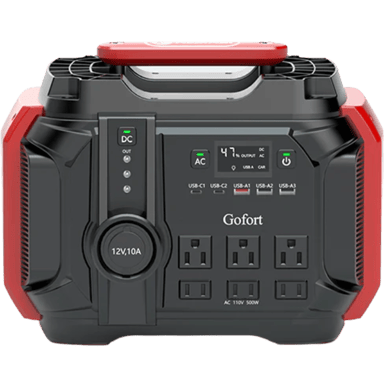

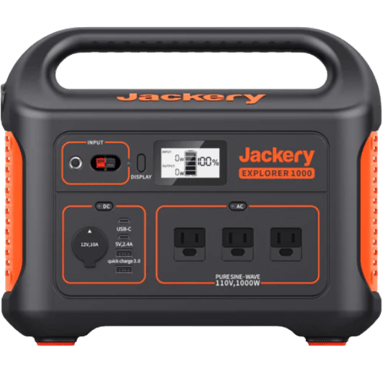
 Recaptor

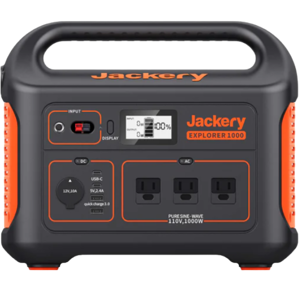
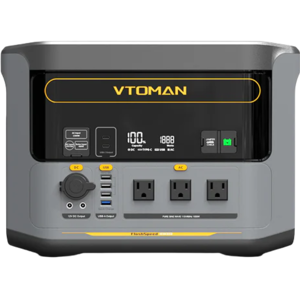
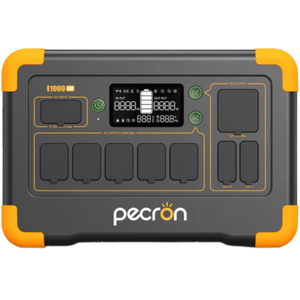
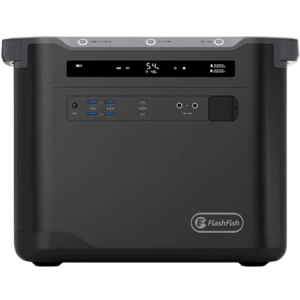


 20
20